

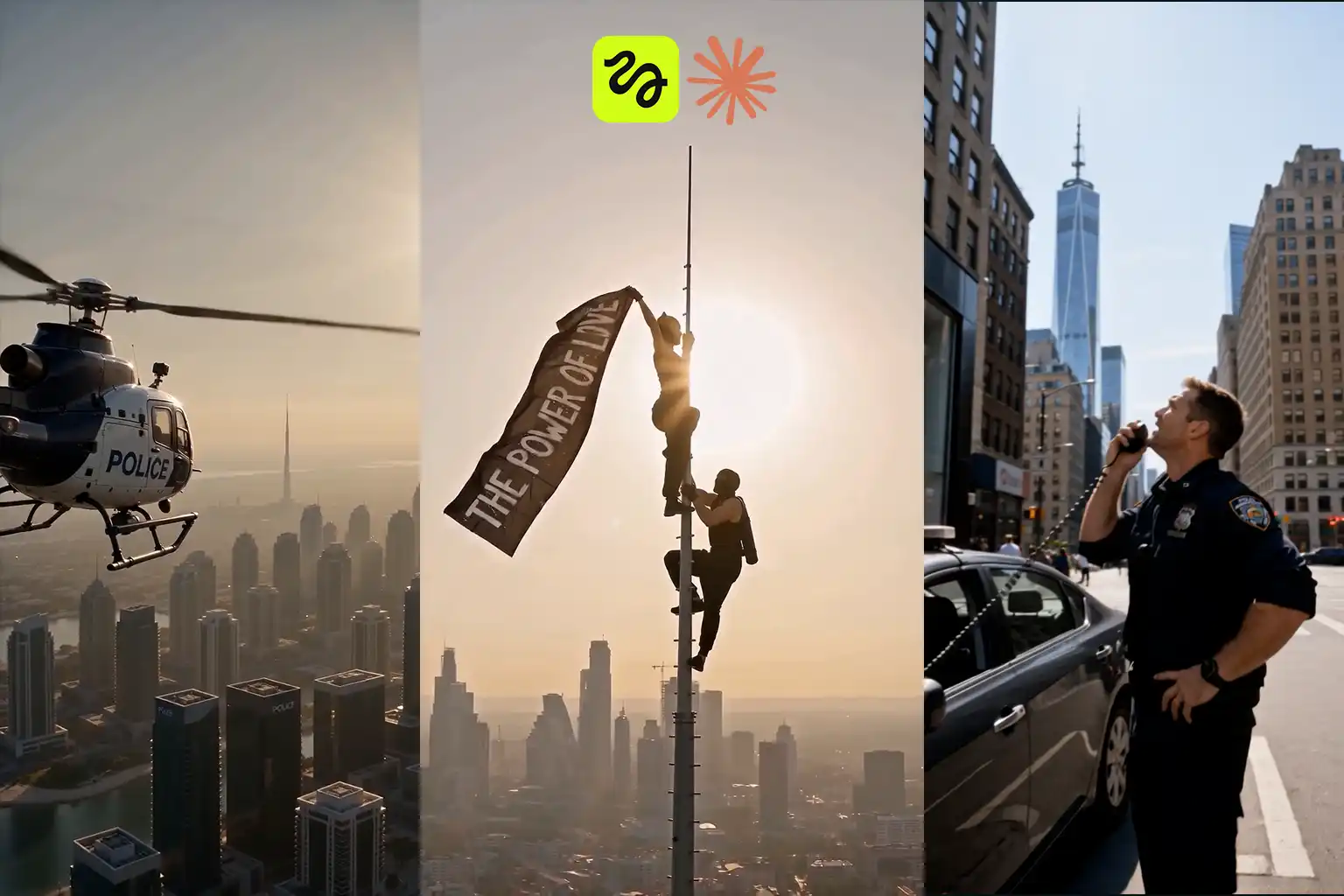

No cameras. No crew. One producer, one AI director, three long nights. The result: a 30-second teaser in which two masked climbers scale a needle-thin antenna mast above New York, police rush the roof, the whole city stares upward — and at the top, a banner unfurls: THE POWER OF LOVE.
This is the complete workflow — every step, every tool, and every expensive mistake — so you can skip straight to the parts that work.
The stack
Three tools, three jobs. Suno generated the metalcore track. Higgsfield did all the visual generation — Seedance 2.0 for video, Nano Banana Pro and GPT Image 2 for stills and assets. Claude (Fable 5) worked as the director and prompt engineer: it held the story, wrote every structured prompt, audited my asset library when generations drifted, and debugged content-filter rejections. The division of labor matters. The image and video models are phenomenally talented and completely amnesiac; the LLM is what gives the project a memory.
Step 1: The track comes first
The teaser was built for a metalcore track generated in Suno, and that order is the point. Music defines structure: the buildup told me the first fifteen seconds needed claustrophobic fast cuts, the breakdown demanded a single monumental reveal shot, and the outro earned an intimate beat. Generate many track variants, keep the one whose dynamics you can see as an edit, and let its timing dictate your shot lengths before a single frame exists.
Step 2: Story before pixels
We wrote a beat sheet, not a prompt: two climbers ascend an impossibly thin mast (close-ups only — the audience shouldn’t understand where they are), a zoom-out reveals the horrifying height, a news-helicopter 360° orbit reveals the banner, street inserts show the city and the police reacting, and it all lands on a kiss through lifted balaclavas. Every shot serves the reveal structure. If you can’t say what each shot withholds and what it pays off, you’re not ready to generate.
Step 3: Assets before shots
This is the single biggest difference between a coherent film and AI soup. Before any video, we generated and locked reference assets: two character sheets (multi-pose, on a neutral background), the mast with its red beacon platform, the long painted banner, a police helicopter. Each asset was iterated as a cheap still until approved, then saved in Higgsfield as a named element and referenced by tag in every subsequent prompt.
Two hard-won rules. First, the tag in your prompt must match the asset name in your library exactly — my characters generated with winter boots for an entire evening because the prompts said one name and the library said another, so the references never bound and the model invented freely. When output drifts, audit the names before touching the prompt. Second, iterate assets as stills, never as video: a still costs a fraction of a clip and you approve exact pixels, not tendencies.
Step 4: Structured prompts, written like a shot list
Every video prompt followed the same skeleton: scene context, active references, a location map in depth layers, the exact first frame, format mode, per-segment optics, camera behavior with physical speeds, a time-coded action block with hard cuts at exact seconds, performance, physics, lighting with a fixed white balance, color grade, style, and a closing block of positive locks.
The principles that did the heavy lifting: write the visible (not “she is scared” but what fear looks like on a masked face); state physics in numbers (a helicopter orbits at 90 km/h — my first orbit prompt asked for a full 360° in ten seconds and it looked like a video game, because that’s fighter-jet speed); cut on timecodes matched to the track’s rhythm; and lock everything that must not change in a final positive-locks paragraph, because models drift toward their priors the moment you leave something unstated.
Step 5: Stills first, then animate
The most valuable trick in the whole pipeline: generate your hero frame as a still image, iterate it until it’s exactly right, then feed it to Seedance as the start frame and animate from it. The video model cannot reinvent what already exists as pixels — the thin mast stays thin, the pose stays posed, the banner text stays spelled. For zoom-outs, the same logic works in reverse with an end frame: the pull-back is forced to land on your approved wide composition. Text-only video prompts are a lottery; start-frame prompts are direction.
Step 6: Draft cheap, finish expensive
Seedance 2.0 Mini renders the same prompt at roughly a quarter of the credits of a full-quality 1080p run. Every complex shot got a Mini draft first — checking cut timing, reference binding, and continuity — then one corrected final on Seedance 2.0 std. One cheap draft reliably saves two expensive re-rolls. Claude preflighted the exact credit costs through Higgsfield’s API before every batch, which turned budgeting from vibes into arithmetic.
Step 7: The failure playbook
Half the production time went to fighting drift, and every fight taught a reusable fix.
Landmark priors. The model kept inserting Burj Khalifa into New York — because my prompt said “one supertall spire above the cluster,” which is that building’s job description. Delete the cause in the positive text; negative prompts are a mop, not a hammer.
Training-data gravity. Masked climbers on a thin mast over a hazy city matches years of Hong Kong rooftopping footage, so faces and signage drifted East. The fix was positive description of what we wanted — specific architecture, unmarked facades, English-only incidental text — plus negatives on both fronts.
Reference bleed. A broadcast image meant for TV screens appeared painted on a building in the background. Wording barely helps once bleed is this strong; the real fixes are structural: generate a clean plate and composite the screen content in post, or bake the screen content into an approved still and animate from it as a start frame with no reference attached.
Plastic people. Close-ups of crowds came out airbrushed and mannequin-smooth. The cure is occupying the prompt with imperfection — sweat sheen, stubble, frizz, creased cheap fabric — and switching the lighting language from “clean” to “unflattering ENG documentary harshness.” Beauty light pulls beauty priors.
Object proportions. “Long banner” still produced a flag until proportion became geometry: a strip four times longer than tall, letters spanning its full length, first letter just inside one edge and the last just inside the other. State coverage as measurements, not adjectives.
Content filters. Repeated “sensitive content” rejections took a binary search to crack: run the prompt with no references to isolate text from images, then strip the triggers — comic-book character names in asset tags, the word “balaclava” (say “knit sport hood”), ethnicity terms (describe appearance instead), fear-and-crime vocabulary (“athletes on a maintenance ladder,” not “masked climbers scaling a tower”). Your reference sheets carry the actual look; the text just has to stop confessing to a crime the classifier is listening for.
Step 8: Post-production is still production
AI generates footage; it does not finish films. The broadcast graphics — LIVE bugs, lower thirds, channel logos — were always planned as real overlays in the edit, because generated UI text is reliably mangled. A phantom object on a building facade came out with After Effects content-aware fill in ten minutes, far cheaper than gambling a re-roll of an otherwise good take. The banner’s painted typography doubles as the title card. The grade, the cut against the track, the sound design — all human, all decisive.
What Claude Fable 5 actually contributed
It’s tempting to describe the LLM’s role as “writing prompts,” but that undersells it. Across three nights it held the entire production in memory: which assets were locked and what they were named, which slogan we’d settled on, which failures we’d already diagnosed. It ran cost preflights and diagnostic generations through Higgsfield’s API, audited my element library and found the naming mismatch that had burned an evening of credits, restructured shots when physics didn’t hold, and rewrote prompt after prompt through the content-filter fight without losing a single creative decision. The models are the cast and the camera department. The LLM is the person on set who has read the script.
The takeaways
Lock your assets before you shoot. Match your tag names to your library exactly. Approve stills, then animate from them. Draft on the cheap model, finish on the expensive one. Give the camera real-world physics. Describe what you want and never what you don’t. Treat filters as a debugging problem, not a wall. And keep post-production in the plan from day one — because the last ten percent is still where films are made.
The track came out of Suno in an afternoon. The teaser took three nights. The pipeline is now reusable in one.
Tools: Suno · Higgsfield (Seedance 2.0, Nano Banana Pro, GPT Image 2) · Claude Fable 5


Hi, this is a comment.
To get started with moderating, editing, and deleting comments, please visit the Comments screen in the dashboard.
Commenter avatars come from Gravatar.